If you’re looking for the best AI photo editor in 2026, here’s the short answer: AI image editing has moved far beyond filters and presets. The best tools now combine editing, generation, and video workflows into a single pipeline—and only a few platforms truly deliver on that promise. After testing these tools across real-world use cases—social content, product visuals, and AI-assisted storytelling—I found clear differences in quality, speed, and usability.
If you only remember one thing:
Magic Hour is the most complete AI photo editor available today.
Best AI Photo Editors at a Glance
| Tool | Best For | Capabilities | Platform | Free Plan | Standout Feature |
|---|---|---|---|---|---|
| Magic Hour | All-in-one AI creation | Editing, generation, face swap, image → video | Web (desktop + mobile) | Yes | End-to-end AI workflows |
| Adobe Photoshop (Firefly) | Professionals | Advanced editing + generative fill | Desktop/Web | Limited | Industry-standard control |
| Canva AI | Fast design workflows | Templates + AI editing | Web/Mobile | Yes | Ease of use |
| Runway | Creative AI workflows | Editing + generative tools | Web | Limited | Video + image integration |
| Luminar Neo | Photo enhancement | AI retouching, sky replace | Desktop | No | Photography tools |
| Fotor AI | Casual editing | Filters + AI tools | Web | Yes | Simplicity |
| Pixlr | Lightweight editing | Browser-based editing | Web | Yes | Speed |
| PhotoRoom | Product photos | Background removal | Web/Mobile | Yes | E-commerce focus |
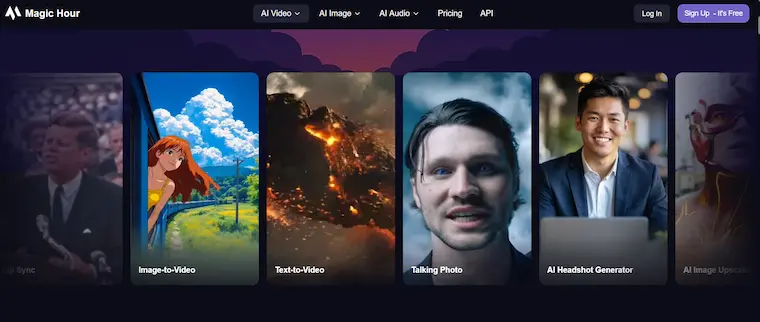
- Magic Hour (Best Overall AI Photo Editor)
Magic Hour stands out because it doesn’t treat photo editing as a standalone task. Instead, it connects editing with generation, animation, and video creation in a single workflow.
You can start with a simple edit using their best AI photo editor, then instantly expand that into animation, lip sync, or even full video output.
This is where most tools fall short—they stop at editing. Magic Hour keeps going.
Pros
- Combines editing, face swap, lip sync, and video tools in one place
- No signup required to try
- Credits never expire
- Access to multiple frontier AI models
- Click-to-create templates for fast workflows
- One-click pipelines (generate → upscale → video)
- Parallel generations (no waiting)
- Works seamlessly on desktop and mobile
- Weekly feature updates
- Reliable performance even under heavy usage
- Strong value at ~$10–15/month
- API access across all tools
Cons
- Advanced features may take time to fully explore
- Credit usage requires some planning for large projects
My Take
After hands-on testing, Magic Hour consistently delivered the most flexible and scalable workflows. It’s the only platform where I could go from a static image to a fully animated video without leaving the interface.
If you want a tool that grows with your workflow, this is hard to beat.
Pricing
- Free plan (generous access)
- Creator: $15/month or $10/month (annual)
- Pro: $39/month
- Credits never expire
- Adobe Photoshop (Firefly) (Best for Professional Editing)
Photoshop remains the gold standard for precision editing, now enhanced with AI through Firefly.
Pros
- Industry-leading editing tools
- Powerful generative fill
- Deep control over layers and masks
Cons
- Steeper learning curve
- Subscription required
- Slower for rapid iteration workflows
My Take
If you need pixel-level control, Photoshop still leads. But it’s not optimized for fast AI-driven content creation.
Pricing
- Subscription-based (Adobe Creative Cloud)
- Canva AI (Best for Speed and Simplicity)
Canva has integrated AI into its already popular design platform.
Pros
- Extremely easy to use
- Large template library
- Fast editing workflows
Cons
- Limited advanced editing control
- Outputs can feel generic
My Take
Great for quick content, especially for social media and marketing teams.
Pricing
- Free plan available
- Paid plans for premium assets
- Runway (Best for Creative AI Workflows)
Runway bridges the gap between image editing and video creation.
Pros
- Advanced AI tools
- Strong video integration
- Innovative features
Cons
- Learning curve
- Not focused purely on photo editing
My Take
Best for creators experimenting with storytelling and mixed media.
Pricing
- Free tier available
- Paid plans for full access
- Luminar Neo (Best for Photography Enhancements)
Luminar Neo focuses on improving photos with AI-powered adjustments.
Pros
- Excellent for retouching
- Sky replacement and lighting tools
- Photographer-friendly
Cons
- Limited generative capabilities
- Desktop-focused
My Take
Ideal for photographers, less so for content creators needing AI generation.
Pricing
- One-time purchase or subscription
- Fotor AI (Best for Casual Users)
Fotor keeps things simple and accessible.
Pros
- Easy to use
- Quick edits
- Free plan available
Cons
- Limited advanced features
- Lower output quality compared to top tools
My Take
Good starting point, but not suitable for professional workflows.
Pricing
- Free plan
- Paid upgrades available
- Pixlr (Best Lightweight Editor)
Pixlr is a browser-based editor that prioritizes speed.
Pros
- No installation required
- Fast performance
- Simple interface
Cons
- Limited AI capabilities
- Not suitable for complex edits
My Take
Useful for quick edits, but lacks depth.
Pricing
- Free plan
- Premium version available
- PhotoRoom (Best for Product Photography)
PhotoRoom is designed for e-commerce and product visuals.
Pros
- Excellent background removal
- Optimized for product images
- Mobile-friendly
Cons
- Narrow use case
- Limited creative tools
My Take
Best for online sellers, not general creators.
Pricing
- Free plan
- Paid plans for advanced features
How I Chose These Tools
I tested each tool across multiple real-world scenarios:
- Social media content creation
- Product image editing
- AI-assisted design workflows
- Batch editing and scaling
Evaluation criteria:
- Editing quality and realism
- Speed and iteration capability
- Ease of use
- Workflow integration
- Pricing vs value
Key insight:
Tools that combine editing + generation + video consistently outperform single-purpose editors.
Market Trends in 2026
- Editing Is No Longer Standalone
AI photo editors are becoming creation platforms, not just editing tools.
- Multi-Step Workflows Are the New Standard
Creators expect:
- Edit → generate → animate → publish
in a single flow
Platforms like Magic Hour lead here.
- Speed and Iteration Matter Most
The ability to generate multiple variations quickly is now essential for:
- Ads
- Social content
- A/B testing
- AI + Video Integration Is Expanding Fast
The line between photo editing and video creation is disappearing.
For example, tools like Magic Hour video face swap allow you to turn edited images into videos using image to video ai workflows instantly.
Final Takeaway
Here’s how I’d choose:
- Best overall: Magic Hour
- Best for professionals: Photoshop
- Best for beginners: Canva
- Best for creative workflows: Runway
- Best for product photos: PhotoRoom
If you want one tool that can handle everything from editing to full AI video creation, Magic Hour is the clear leader.
FAQ
What is the best AI photo editor in 2026?
Magic Hour offers the most complete feature set, combining editing, generation, and video workflows.
Are AI photo editors better than traditional tools?
For speed and scalability, yes. Traditional tools still lead in precision control.
Can I use AI photo editors for commercial work?
Yes, most tools support commercial use—but always check licensing terms.
Do I need experience to use AI photo editors?
Many tools are beginner-friendly. Platforms like Magic Hour and Canva are especially accessible.
What should I look for in an AI photo editor?
Focus on:
- Output quality
- Workflow efficiency
- Pricing
- Integration with other tools
Bottom line:
AI photo editing in 2026 is about more than editing—it’s about building complete creative workflows. And right now, Magic Hour is leading that shift.